
Install Proxmox Backup Server + Tailscale NFS Share สำหรับ backup offsite (LXC)
ตัวอย่างนี้จะทำการติดตั้ง PBS ลงในตัว server เลย แต่จะ mount nfs ผ่าน tailscale โดยใช้ raspbery pi zero 2w เพื่อนำไปติดตั้ง backup ไว้ที่อื่น เช่นบ้านญาติพี่น้อง ที่ทำงาน บลา ๆๆ
ติดตั้ง PBS LXC
ใช้ script จาก https://community-scripts.github.io/ProxmoxVE/scripts?id=proxmox-backup-server
bash -c "$(curl -fsSL https://raw.githubusercontent.com/community-scripts/ProxmoxVE/main/ct/proxmox-backup-server.sh)"หลังจากนั้น Disable Enterrpise Repo แนะนำให้ Yes ทุกข้อ
bash -c "$(curl -fsSL https://raw.githubusercontent.com/community-scripts/ProxmoxVE/main/tools/pve/post-pbs-install.sh)"อย่าข้าม Disable Enterrpise Repo ไม่งั้นลงไม่ได้
ติดตั้ง Tailscale
จาก https://tailscale.com/kb/1031/install-linux
curl -fsSL https://tailscale.com/install.sh | shหลังจากติดตั้งแล้วมันจะแนะนำให้ tailscale up ซึ่งมันจะรันไม่ได้ ต้องทำตามนี้ก่อน
https://tailscale.com/kb/1130/lxc-unprivileged
ดู lxc id จากตัวอย่างคือ 101
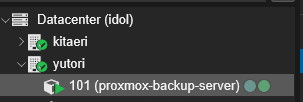
ไปที่ shell ของตัว server ดูเลข id ให้ตรงแล้วใส่คำสั่งลงไปเช่น
nano /etc/pve/lxc/101.confเพิ่มลงไปในแถวสุดท้าย
lxc.cgroup2.devices.allow: c 10:200 rwm
lxc.mount.entry: /dev/net/tun dev/net/tun none bind,create=file
กด ctrl+x หลังจากนั้น y และ enter ออกมา
reboot lxc และลองพิมพ์ tailscale up จะพบว่าใช้งานได้แล้ว
ให้ทำการ copy url ไป authenticate เข้า id เราตามปกติ (อย่าลืมไป disable key expire ด้วย)
หลังจากนั้นให้ทำ NFS Share ได้ตามปกติ