
AUTOMATIC1111 - Cheat Sheet
https://stablediffusion.cdcruz.com/
Parameters
Sampling method - the diffusion sampling method.
Sampling steps - how many steps to spend generating (diffusing) your image.
Restore faces
Tilling
Hires. fix
Width - ความกว้างของรูป
Height - ความสูงของรูป
ถ้าอยากได้ภาพเต็มตัวแนะนำให้กำหนดความสูงมากกว่าความกว้างของภาพ แล้วใส่ prompt ปกติ หลังจากนั้นให้ไป fill ขอบทีหลังเอา
Batch count
Batch size
CGF Scale
- txt2img ยิ่งมากยิ่งเหมือน prompt ที่กรอกลงไป
- img2img ยิ่งน้อยยิ่งเหมือนรูปต้นฉบับที่ใส่ลงไป ถ้ามากก็จะไปอิง prompt
Seed - The seed used to generate your image.
Attention/emphasis
https://github.com/AUTOMATIC1111/stable-diffusion-webui/wiki/Features#attentionemphasis
Using () in the prompt increases the model's attention to enclosed words, and [] decreases it. You can combine multiple modifiers:

Cheat sheet:
-
a (word)- increase attention towordby a factor of 1.1 a ((word))- increase attention towordby a factor of 1.21 (= 1.1 * 1.1)a [word]- decrease attention towordby a factor of 1.1a (word:1.5)- increase attention towordby a factor of 1.5a (word:0.25)- decrease attention towordby a factor of 4 (= 1 / 0.25)a \(word\)- use literal()characters in prompt
With (), a weight can be specified like this: (text:1.4). If the weight is not specified, it is assumed to be 1.1. Specifying weight only works with () not with [].
If you want to use any of the literal ()[] characters in the prompt, use the backslash to escape them: anime_\(character\).
On 2022-09-29, a new implementation was added that supports escape characters and numerical weights. A downside of the new implementation is that the old one was not perfect and sometimes ate characters: "a (((farm))), daytime", for example, would become "a farm daytime" without the comma. This behavior is not shared by the new implementation which preserves all text correctly, and this means that your saved seeds may produce different pictures. For now, there is an option in settings to use the old implementation.
NAI uses my implementation from before 2022-09-29, except they have 1.05 as the multiplier and use {} instead of (). So the conversion applies:
- their
{word}= our(word:1.05) - their
{{word}}= our(word:1.1025) - their
[word]= our(word:0.952)(0.952 = 1/1.05) - their
[[word]]= our(word:0.907)(0.907 = 1/1.05/1.05)
Basic Prompt
https://github.com/Lopyter/stable-soup-prompts/tree/main/wildcards
Camera Control
zoom out the camera
full body shot
full body portrait
head to toes
standing in a field
walking in a hallway
portraits
TWEAK
Clip Skip
คือ AI อีกตัวที่ใช้ encode prompt ที่เราใส่เข้าไป ก่อนจะเข้าไปก่อนที่ชุด ถึงตัวโมเดลprompt จะเข้าไปถึงตัวโมเดลและสร้างภาพขึ้นมา การตั้งค่า Clip Skip มากกว่า 1 ก็เหมือนการที่เราเข้าไปยุ่งกับ prompt อีกรอบหนึ่ง บลา ๆ ๆๆๆๆๆ
สรุปง่าย ๆ คือ เมื่อ gen ภาพออกมาแล้วรู้สึกว่าภาพนี้แหละที่ใช่ที่สุดสำหรับเราแต่เหมือนมันยังขาด ๆ เกิน ๆ เกือบจะได้แล้ว ก็ให้ลองเปิดใช้ Clip Skip ใน seed ที่ถูกใจนั้นและลองดูผลที่ออกมา
prompt ตัวอย่าง
best quality, ultra high res, (photorealistic:1.4),1girl,red hair,(pigtail),((bright golden eyes)),
black suit, black suit pants,tie white shirt, long bangs,
night,wet,rain,cyberpunk street
จากตัวอย่าง ภาพที่เราอยากได้จริง ๆ คือ Clip Skip 1 (ดีฟอลมันคือ 1 ถ้าไม่ไปปรับ)แต่เราก็ลอง Skip 2 ขึ้นมาเพื่อดูว่ามันอาจจะดีกว่า 1 หรือไม่ ส่วน 3-5 นั้นจะเห็นว่าห่างจากสิ่งที่เราต้องการไปเยอะมาก ไม่มีกระทั่งชุด suit ตัวไม่เปียก สีผมก็เปลี่ยนไปจาก prompt เลย ดังนั้นยิ่งไกลจาก 1 ก็ห่างจากคำที่เรากรอกมากขึ้น ๆ
เทคนิคนี้ถูกใช้งานในหลาย ๆ โมเดลที่โหลด ๆ กันมาใช้ และมันคือสิ่งที่พอเราลอง gen ภาพดูแล้วมันไม่เหมือนที่เขาทำกันไว้เลย
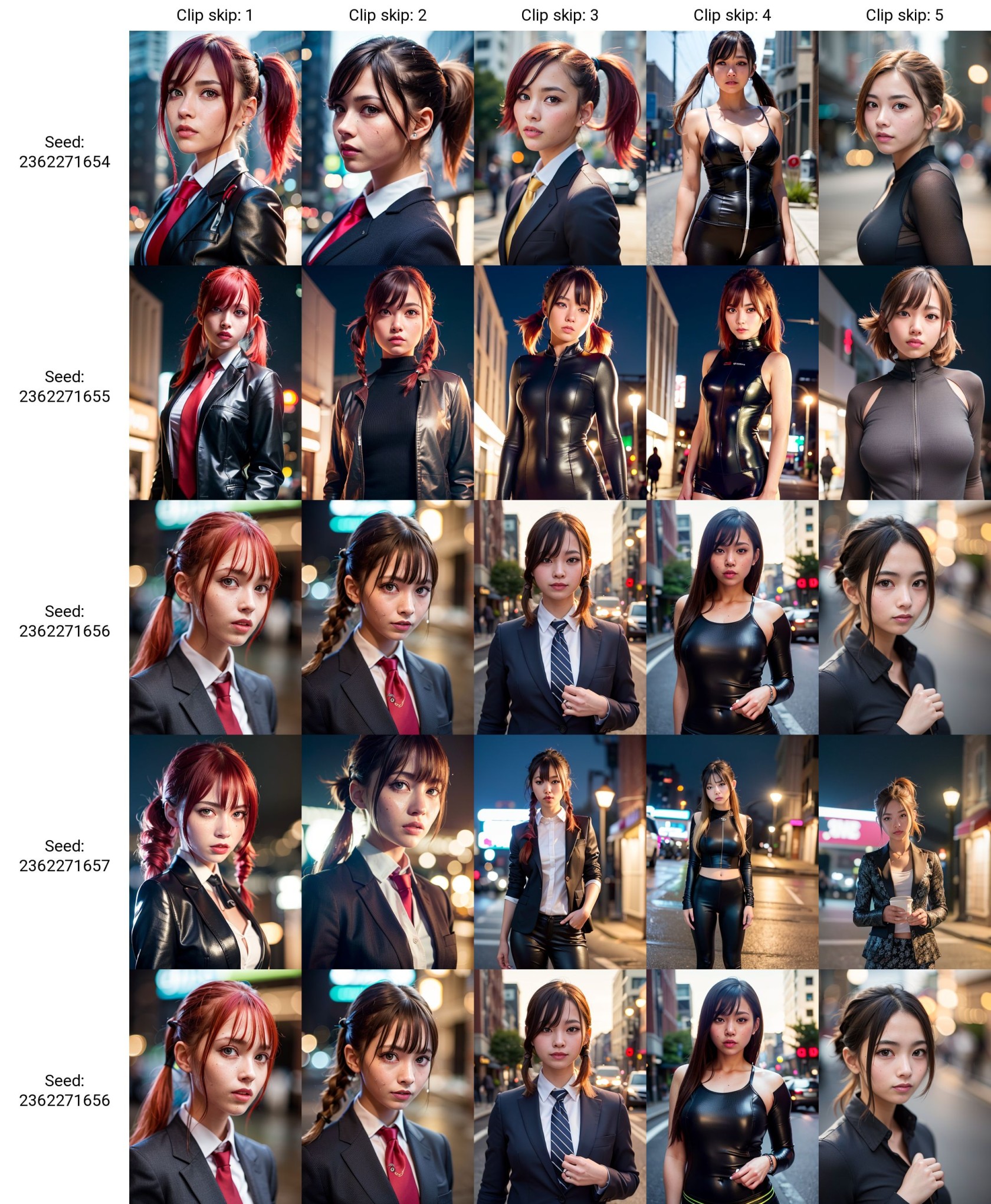
เปิดใช้งาน Clip Skip
เนื่องจากเมนูมันซ่อนลึกลับมากใน Settings ไม่แนะนำให้ไปควานหาและเปิด ๆ ปิด ๆ ทุกครั้ง

เพื่อความสะดวกในการใช้งาน ให้สร้างเมนูไว้เป็น tab ด้านบน รายละเอียดไปอ่านได้จาก Config แนะนำก่อนเริ่มใช้งาน
ไม่ได้ใช้
ใช้ Waifu Diffusion
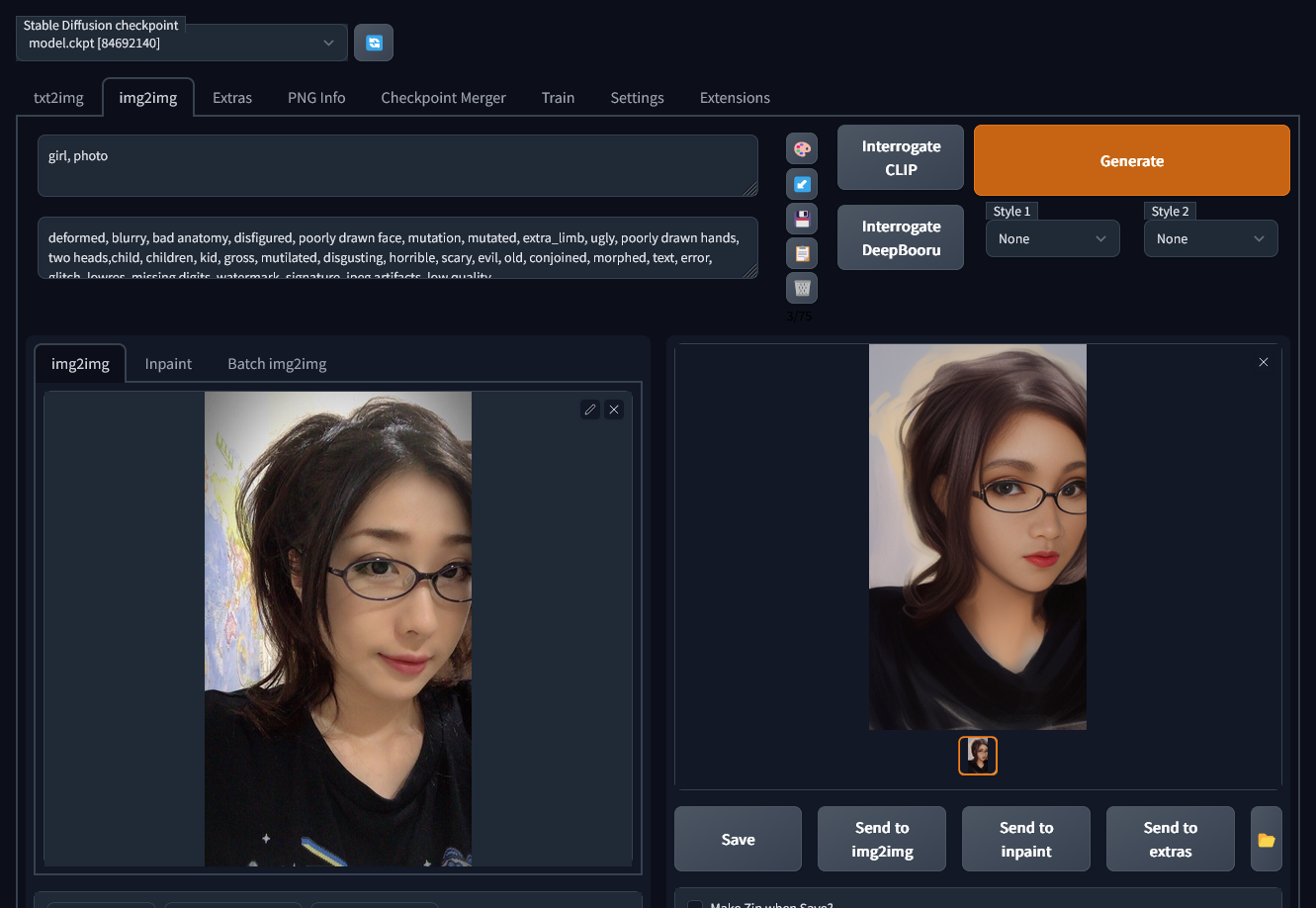
img2img
Prompt
Girl = ผู้หญิง (ยืนพื้นด้วย prompt นี้)
Photo = เพิ่มความสมจริง
beautiful =
หรือใส่อะไรก็ใส่คำพื้นฐานทั่วไป
-
Monochome or black and white - massive influence - will make everything black and white
-
Sepia - mild influence - will give a sepia colour palette.
-
Color/ colour - weak influence - Not really required for more images as they are usually in colour.
-
Colourful/ colorful - mild influence - Will add more variety of colour in the image.
-
Traditional Art - mild influence - a general art prompt with varying styles and detail.
-
Painting - strong influence - will add paintery brush strokes to image.
-
Ink art - mild influence - Basically makes black and white drawings.
-
Chalk art - mild influence - Sometimes adds a chalk effect to image, sometimes adds random blackboard scribbles to background.
-
Oil painting - weak influence - seems to be less powerful than simply using "painting".
-
Watercolour/watercolor - strong influence - adds a similar effect as "painting" but does distinctly look more watercolour-like.
-
Drawing - mild influence - Will add a more pencil-like style to the image. But seems more digital pencil than real pencil.
-
Photo/photograph - strong influence - will make the image much more realistic, but in Waifu Diffusion it will maintain anime characteristics and skin will be smooth.
-
Canon 50D (or other camera types) - mild/ strong influence - will make the image more realistic.
-
Cinematic lighting - mild/strong influence - will add more dramatic lighting and usually a point light in the scene. Also darker scenes and backlit scenes.
-
God Rays - mild/strong influence - will add a strong sun light that will usually shine on one side of a persons head/ hair. Can also add rays of light but less likely.
-
Cell Shading - strong influence - a detailed anime style, most similar to visual novel characters.
-
Anime - strong influence - Anime
-
Waifu - Despite the name of the ai, doesn't seem to change much style wise.
-
Key Visual - strong influence - A detailed anime style while keeping the anime characteristics or big eyes, etc.
-
Hentai - mild/strong influence - This prompt varies between realistic and anime style depending on other prompts and will also obviously make the image more lewd.
-
Artstation - strong influence - A variety of artstyles, usually more professional looking.
-
By Toei Animation - strong influence - A better anime prompt for more detailed anime.
-
By Studio Ghibli - strong influence - A better anime prompt for simple anime characters and classic Ghibli backgrounds.
-
In the style of Mappa - mild influence - Another anime style.
-
By Kyoto Animation - mild influence - Anime
-
In the style of Cloverworks - mild influence - Anime
-
Model - mild influence - Helps a person look more "perfect", they will also usually look directly at the camera.
-
Instagram - mild influence - Characters have a much wider range of poses and camera angles
-
vtuber - strong influence - will generate anime characters mainly in the style of vtubers.
-
Snapchat - weak influence - Similar to "Instagram" but also produces more selfie-like images.
-
Professional - weak influence - looks more professional shot and has more background variety butthe background is usually out of focus.
-
Ponytail/pigtails/braids/(Various hairstyles) - strong influence - will change hairstyle a lot.
Negative Prompt
deformed, blurry, bad anatomy, disfigured, poorly drawn face, mutation, mutated, extra_limb, ugly, poorly drawn hands, two heads,child, children, kid, gross, mutilated, disgusting, horrible, scary, evil, old, conjoined, morphed, text, error, glitch, lowres, missing digits, watermark, signature, jpeg artifacts, low qualityค่าที่จำเป็น
Width, Height ตั้งให้ใกล้เคียงต้นฉบับ

CFG Scale: 12
Denoise: 0.5 (ยิ่งน้อยยิ่งเหมือนต้นฉบับ ค่านี้ปรับไปปรับมาระหว่าง 0.3-0.5 กำลังดี)